
Subcontractor compliance, tracked from sign-on to sign-off.
Every licence, inspection and closeout certificate tracked automatically, so the proof is ready the moment someone asks.
Pre-start compliance
On-Site Compliance
Closeout Certificates
Cleared to walk on
Nobody starts until their paperwork is in, in date, and right for the state the job is in.
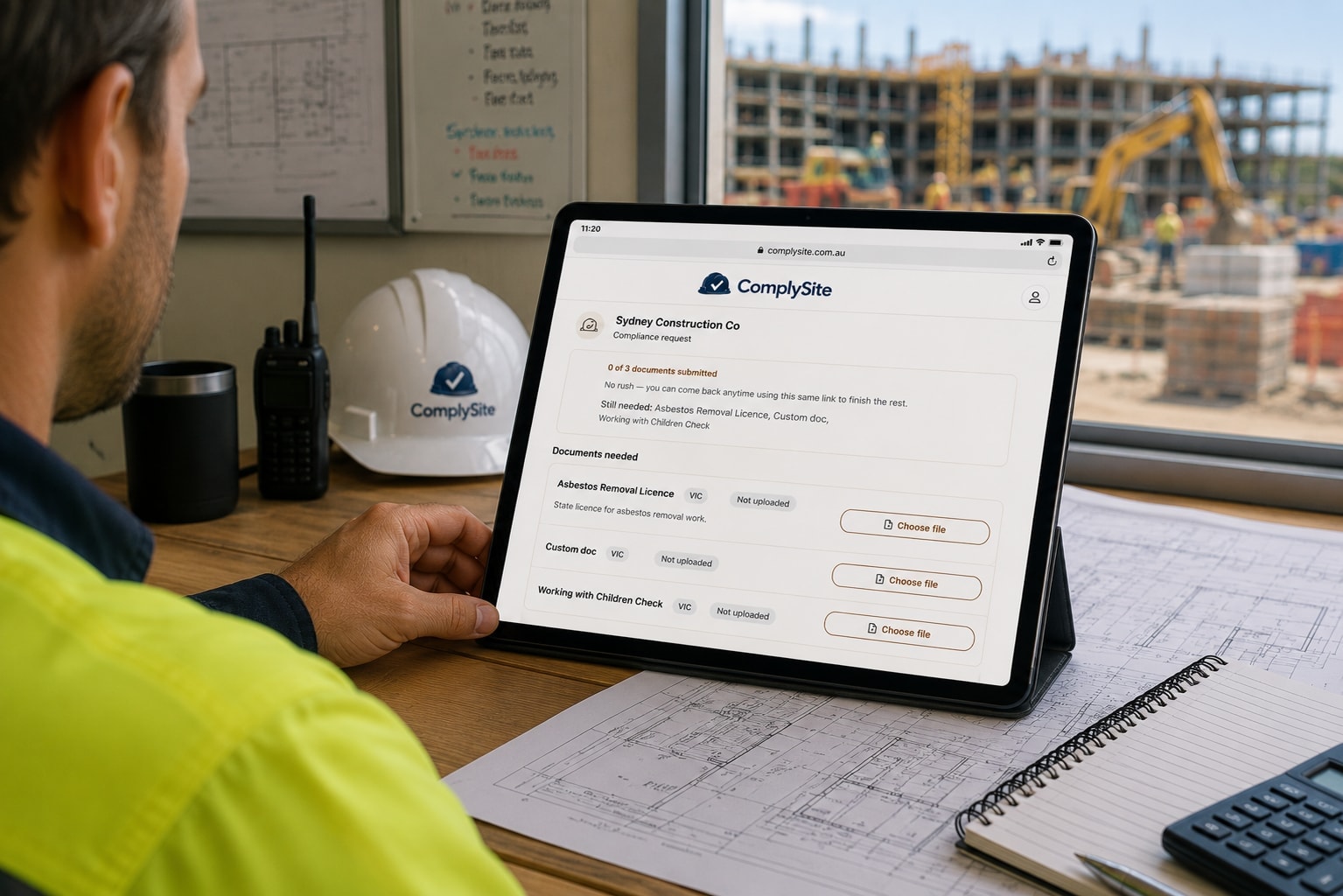
The right checklist for the state the job is actually in.
A White Card in NSW isn't the same document as one in VIC or QLD. ComplySite works out the right checklist from each project's own state and each subcontractor's trade.
- National and state-specific document catalog, kept current
- Each project's checklist is generated automatically from its state
- Need a check we don't already cover? Add your own document type
Directors: one fewer way to be caught out by a state requirement you didn't know applied.
Look up a trade and state
No account, no password, just a phone camera.
Subcontractors get a link by SMS or email, straight to their own checklist. On a phone that's a camera and a couple of taps. Nothing to install.
- One reusable link per subcontractor. It works every time, no re-inviting
- Take a photo or choose a file, done
- Always free for the subcontractor
Photograph the licence. We'll read the expiry date.
ComplySite reads the expiry date off the photographed document and offers it back to confirm in one tap. No typing, no mistyped dates.
Included in some plans, and available as an add-on on selected others, or in a bundle that saves up to $14/mo. See pricing
How it reads documentsABN checked for you.
Each subcontractor's ABN is checked against the Australian Business Register, so you know the business you're engaging is the one on the paperwork.
What ComplySite checks, and what it doesn'tChecks that repeat, logs that happen
Some compliance isn't a document that expires once. It's a check that repeats on a schedule, or a log that only matters when something happens on site.
Included in some plans, and available as an add-on on selected others, or in a bundle that saves up to $14/mo.See pricing

Scaffold tags, fall-arrest checks, silica monitoring. Logged, not forgotten.
ComplySite tracks recurring inspections and site logs the same way it tracks everything else: automatically, by subcontractor, by project.
- Recurring inspections run on their own schedule. Overdue shows up the same way an expired licence does
- Event logs are recorded when they happen, with no due date forced onto them
- Works without signal and syncs when you're back online
Site supervisors: one less paper scaftag register to chase down when someone asks for proof.
See the 30-day scaffold ruleChecks that repeat
Scaffold inspections, fall-arrest harness checks, silica dust management sheets. Each on its own interval, with a reminder before it falls due.
Logs that happen
Concrete delivery dockets, crane lift plans, piling logs, lock-out/tag-out isolation logs, pressure test logs. Recorded against the real event.
Silica dust monitoring rulesYour own checks
Add a custom document type for anything your contracts require. Make it time-based, event-based, or both.
Not done until it's signed off
The work is finished. The certificates that prove it was done properly usually aren't in yet.
Included in some plans, and available as an add-on on selected others, or in a bundle that saves up to $14/mo.See pricing

The job isn't done until the paperwork says so.
A Certificate of Electrical Safety, a plumbing compliance certificate, a trade closeout sign-off. Each has its own name depending on the state. ComplySite tracks who still owes one, the same way it tracks a licence.
- Closeout certificates tracked per subcontractor, per project
- Covers electrical and plumbing compliance certificates, not just the big-ticket documents
- Missing certificates show on the dashboard before a client asks for them
Office admins: one place to check instead of emailing five trades after the job's already finished.
COES, CCEW and state-by-state rulesOpens when you mark the project complete
Closeout requirements appear for every subcontractor on the project at the moment you mark it complete, so nobody is chased for a certificate before the work is done.
One picture, kept current
Whatever stage a job is at, these run underneath it.
Every project, the whole picture, always current.
One view shows where every project stands, updated the instant a document lands. Install it to your home screen and it opens like a native app.
- A verdict per subcontractor, with the full document detail one tap away
- Updates immediately. No page refresh, no manual sync
- Installable on any phone, tablet or laptop
Directors: a clear answer to "are we exposed right now" without asking anyone.
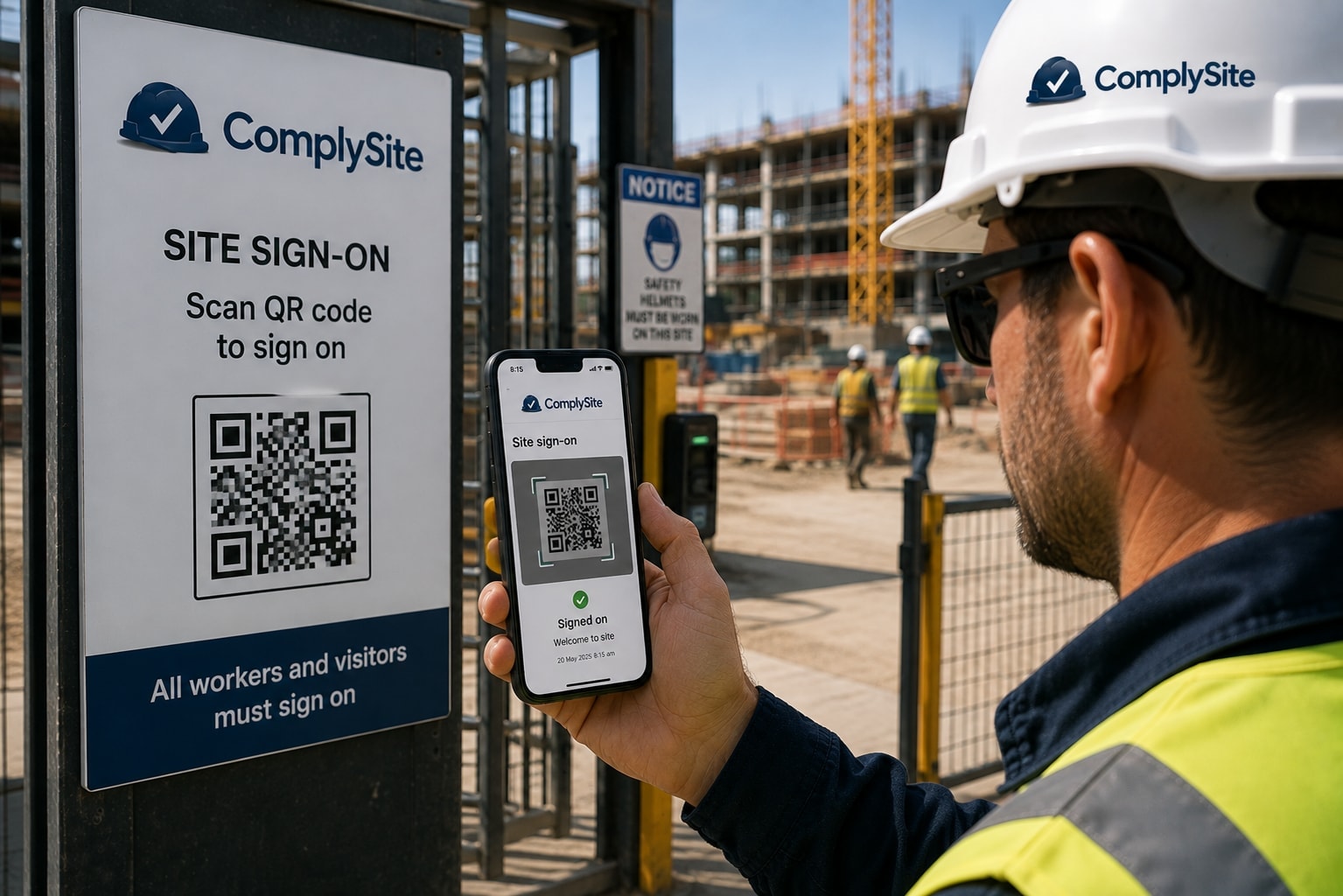
One code, a full attendance record.
Print one QR code per project and post it at the gate. Everyone scans in and out from their own phone. No sign-in sheet, no admin.
- One QR code per project, printed once
- Scan in and out from any phone browser. Nothing to install
- A live "who's on site now" view plus a full attendance history
Nobody has to remember an expiry date.
Subcontractors are reminded before a document expires. You're told the moment something lapses. No spreadsheet of dates to maintain.
When someone asks for proof, you already have it.
One-click CSV or PDF export per project, covering every subcontractor and every stage, including the logged history for recurring and event-based items.
Coming soon.
State licence verification
Checking a subcontractor's trade licence directly against the issuing state regulator's own register, not just the document they uploaded.
Compliance Passport
A subcontractor uploads their documents once and reuses the same verified profile across every builder they work for on ComplySite — not a fresh upload for every job.
Ready to see it on your own projects?
Sign up freeQuestions builders ask about the features
No. Each subcontractor gets a reusable link by SMS or email. They open it in their phone browser, photograph their documents and upload them. There is nothing to install, no password to remember, and it is always free for them.
When you create a project, ComplySite builds the checklist from the national and state requirements for the state the job is in. You can also add your own document types if your contracts ask for something extra.
The subcontractor photographs a licence, card or certificate. ComplySite reads the expiry date from the image and the subcontractor confirms it in one tap, so the date on your dashboard is one a person has checked. Expiry detection is included in some plans and available as an add-on on selected others, or in a bundle that saves up to $14 a month; the pricing page shows which.
Cleared means every required document is uploaded and in date. Expiring soon means at least one document runs out within 30 days. Not cleared means a required document is missing or has expired. You see the status for each subcontractor on the dashboard and can open any document behind it.
Subcontractors are reminded before a document expires, so they can renew it without you chasing. You are notified when a document goes red. Reminders go out 14 and 7 days before a document expires, and again on the day it expires.
Each project has one QR code. Workers scan it with their phone camera to sign on and off, with nothing to install. You see who is on site right now and keep a full attendance history.
Yes. The dashboard works in any browser and can be installed on a phone, tablet or laptop like an app.
Not yet. ComplySite checks that documents are present and in date, and checks ABNs against the Australian Business Register. Checking licences against state regulator registers is on the roadmap. Until then, you decide whether a licence is genuine and covers the work.
Yes. The requirements catalogue covers all states and territories, and each project uses the checklist for its own state. See the full compliance catalogue
SafeWork NSW requires a scaffold to be inspected at least every 30 days by a competent person, on top of a daily visual check by whoever's using it. ComplySite tracks each scaffold as its own recurring item on that schedule, so an overdue inspection shows up on your dashboard the same way an expired licence does, not just on a tag at the site. How the 30-day rule works
Not every job -- air monitoring is required when there's genuine uncertainty about whether a worker's exposure exceeds the workplace exposure standard, alongside separate health monitoring and RPE fit-testing obligations for workers in high-risk silica processes. ComplySite logs each monitoring event against the subcontractor and project it relates to, with no due date forced onto a check that's genuinely event-driven. What triggers monitoring
It depends on the trade and the state -- Victoria's electrical certificate is called a Certificate of Electrical Safety (COES), while NSW calls the same kind of document a Certificate of Compliance for Electrical Work (CCEW), and plumbing/drainage work has its own separate certificate again. ComplySite tracks which certificates each subcontractor still owes at handover, the same way it tracks a licence. State-by-state certificate names
The report is a per-project export (CSV or PDF) covering every subcontractor and every lifecycle phase -- current status for licences, insurance and certificates, plus the full logged history for recurring inspections and event-based items like concrete pours or crane lifts. It's built for whoever asks for evidence after the fact: a client, an insurer, or a regulator. It's available on every plan, not gated to a higher tier.
No. ComplySite is a tracking and reminder tool, not legal or safety advice. It shows what has been uploaded and when it expires, and you stay responsible for deciding whether a subcontractor is compliant. How verification works